Bug Evolution progression depends on timing, upgrades, and smart branch choices. This bug evolution evolution guide explains how to evolve, read the bug tree, and choose paths that support steady growth.
Bug Evolution Evolution Stages and Progression Basics
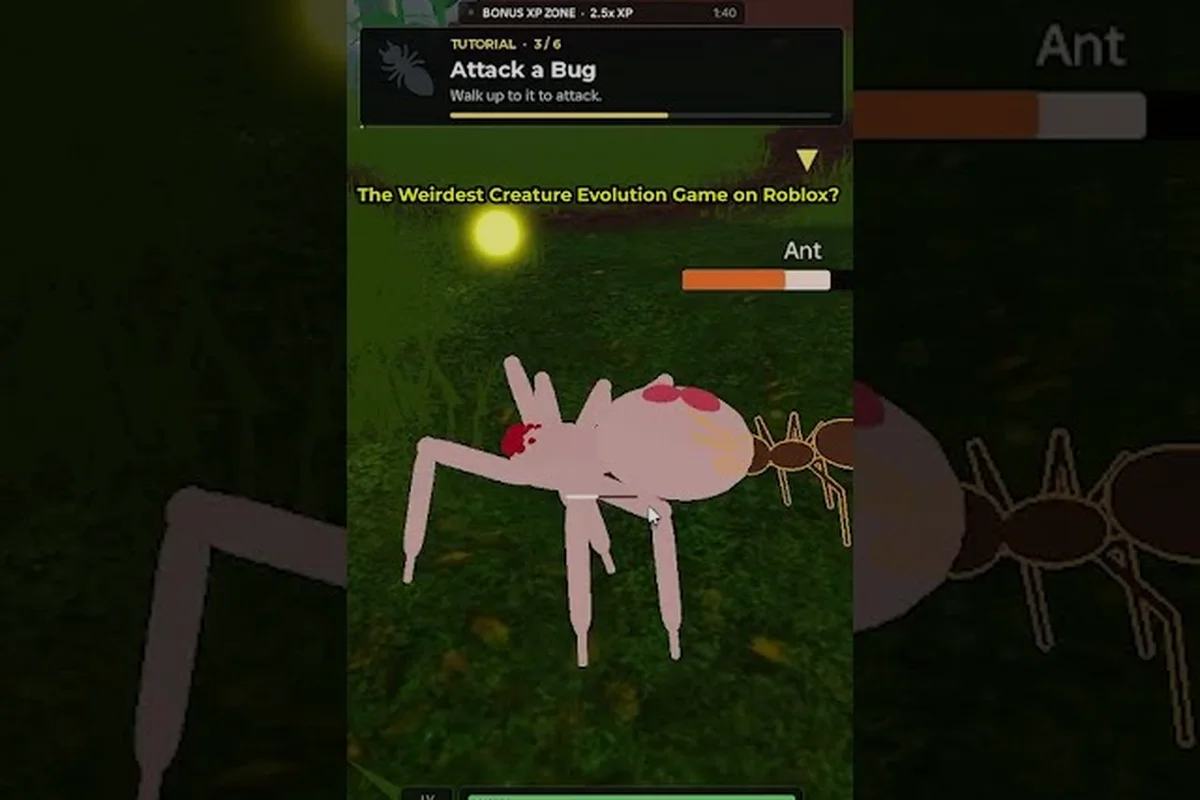
Bug Evolution is a new 2026 Roblox survival game from the | Corgi Crew | group. Players begin as tiny spiders, consume food scattered around a grassy map, gain levels, and unlock more insect forms through the Bug Tree. Understanding the level-gated evolution stages helps you avoid evolving too early, because switching forms resets your current form’s growth channel and starts the new form at its base power.
The game’s interface tracks five visible attributes: Speed, Health, Bite Damage, Bite Speed, and Stamina. Gold coins pay for upgrades, while food fills the progress bar that raises your level. These two resources solve different problems: food moves you through the current stage, while coins strengthen the insect you are already controlling.
| Progression element | Main purpose | Best time to use it |
|---|---|---|
| Small scattered food | Raise the current form’s level | Whenever it is nearby and safe |
| Larger food sources | Accelerate growth toward a milestone | Before a planned evolution |
| Gold coins | Buy combat and movement upgrades | Before and shortly after evolving |
| Bug Tree node | Unlock a new insect form | After meeting level and growth requirements |
| Stat upgrades | Improve a chosen build | When their cost-to-benefit ratio is favorable |
The opening sequence should prioritize survival and understanding the HUD. Eat the closest small food, reach the spider stage at Level 10, and buy the first Bite Damage upgrade before attempting a more difficult food route. This creates a basic attack foundation without leaving your insect underpowered.
Level Milestones and Form Changes
Community footage shows that the earliest progression moves from a housefly base toward spider forms. The tree displays separate tiers from T1 through T6, with requirements increasing as players climb. The visible milestones include Level 10 for the first spider stage, Level 20 for a red-and-white spider, and Level 30 for a white, fluffy spider.
| Tier or milestone | Confirmed progression information | Practical planning goal |
|---|---|---|
| T1 | Basic forms include the Housefly | Reach the first level unlock |
| T2 | Introduces the Spider row | Build enough coin and growth for the next branch |
| T3 | Splits into Locust and Black Widow branches | Compare movement and combat roles |
| T4 | Higher-tier node, with species name not publicly verified | Reach the displayed level requirement |
| T5 | Deep evolution tier with an undisclosed node | Continue preparing resources before switching |
| T6 | Top of the current tree; final species name remains unverified | Prioritize the build that fits your preferred path |
The names of the deepest insects remain uncertain in current footage. Community players often label upper-tier forms themselves, but those labels are not official species names. Treat the tree’s level gates and visible branches as reliable planning information while avoiding assumptions about undisclosed later forms.
How to Read Nodes, Locks, and Evolution Events
The Bug Evolution bug tree explained interface is a branching progression screen rather than a single linear ladder. T1 contains basic forms, T2 adds the spider line, and T3 separates into the named Locust and Black Widow branches. The split is the first substantial decision because each route supports a different style of movement and combat.
Selecting an available node does not simply purchase another insect with coins. The node changes your active form, replaces the current growth route, and places you at the new form’s base power. That makes timing essential: evolve when you have enough food progress and coins to recover quickly, not simply because a new icon has become available.
Reading Nodes, Locks, and Requirements
The tree interface communicates three different states. An available node can be selected, a locked node displays its level requirement, and some upper-tier cells appear as ??? placeholders. Treat a placeholder as a future destination rather than evidence that a particular insect already has a confirmed name.
| Tree symbol or state | What it means | Action to take |
|---|---|---|
| Selectable insect node | Level and growth conditions are met | Evolve only after securing nearby resources |
| Locked insect node | The displayed level has not been reached | Continue farming food and saving coins |
| ??? placeholder | The node exists, but its species name is not verified | Prepare for future content without assuming a name |
| Separate T3 branches | Locust and Black Widow lead into different routes | Compare the intended role before committing |
| Coins shown near an upgrade | Spend currency to strengthen a stat | Buy upgrades before or shortly after the switch |
A player who evolves with no coins remaining can become vulnerable because the new form begins at base power. Save at least enough gold for an attack upgrade and several food pickups, then switch immediately after reaching the required level. The detailed Bug Tree guide can help you organize each node, requirement, and branch more systematically.
What Happens During an Evolution
A practical evolution consists of four actions: reach the required level, preserve your current form’s food progress, protect your coin reserve, and select the intended node. Food consumed before the switch may contribute to reaching the threshold, but the new form begins a fresh growth channel.
This creates a simple rule: bank the level, not wasted resources. Do not consume scarce food if it pushes you past the intended threshold without helping you prepare. Stop at the correct level, equip a basic damage upgrade if needed, and evolve before beginning another long food run. That minimizes the vulnerable window after the stage changes.
Picking a Branch That Fits Your Play Style
Different branches suit different priorities, but the T3 choice comes before most other decisions. A Locust route appears positioned toward faster movement and swarm-style pressure, while a Black Widow route favors the spider identity that continues through later spider-related choices. The HUD’s five attributes let you determine which approach fits your current equipment and objectives.
| Build priority | Better branch tendency | Upgrade focus | Farming implication |
|---|---|---|---|
| Fast rotations | Locust side | Speed and Stamina | Collect smaller food clusters more frequently |
| Aggressive close combat | Black Widow side | Bite Damage and Health | Target larger food when the route is safe |
| Balanced general progress | Compare both T3 branches | Health and Bite Speed | Keep coins ready for whichever branch you select |
| Survival first | Whichever branch lets you secure upgrades quickly | Health and Stamina | Avoid risky food until basic defenses are affordable |
Your best path is not simply the branch with the largest insect. Because evolution resets growth to the new form’s base power, a smaller form may produce faster overall progress if it levels quickly and makes food collection safer. Conversely, a powerful-looking form can stall if its food requirements are expensive and your coin reserve is empty.
The Bug Evolution evolution path guide is useful for comparing milestone requirements more closely. Use it alongside the tree itself rather than treating one species as automatically superior, because your available upgrades and preferred play style can change the value of each route.
Match the Branch to Your Play Style
Players who move constantly and collect many small food sources generally benefit from prioritizing mobility. Those who can secure denser food areas and prefer stronger attacks may gain more value from a damage-oriented branch. The important comparison is progress per minute, not appearance.
Before committing, ask three practical questions:
-
Can you refill the new form’s growth bar without crossing dangerous areas?
-
Can your current coin reserve buy enough attack power after the switch?
-
Does the branch’s stat emphasis match how you collect food?
If any answer is no, delay the evolution by one level or gather a small reserve first. A slightly later switch with a strong setup is usually more efficient than an immediate unlock that leaves you unable to fight or collect food.
Upgrade Priorities for Bug Evolution How to Evolve Efficiently
Coins remain valuable across stage changes, but their value depends on when you spend them. A damage upgrade is most useful before evolution, while mobility and stamina can protect the transition into a larger or more exposed form. The best purchases are the ones that improve your current bottleneck without locking you into an expensive upgrade path.
| Priority | Upgrade area | Why it matters | Practical timing |
|---|---|---|---|
| 1 | Bite Damage | Improves your ability to secure food quickly | Buy Level 1 early and before major transitions |
| 2 | Health | Reduces the cost of a failed food attempt | Purchase before exploring denser or exposed areas |
| 3 | Stamina | Supports sustained movement and collection | Upgrade when routes repeatedly drain stamina |
| 4 | Speed | Helps with rotation and avoiding stronger insects | Increase after basic combat is reliable |
| 5 | Bite Speed | Improves attack frequency | Add when damage and health are already stable |
The most common mistake is treating all five bars as equal purchases. A player with poor damage may struggle to gather efficiently, while a player with excellent damage but poor stamina may fail to escape. Read the HUD after every return to the safe area and spend on the lowest practical bar.
Recommended Upgrade Sequence
Start with Bite Damage Level 1, because gathering food is the foundation of level progress. Next, add enough Health to survive ordinary mistakes, then improve Stamina or Speed according to the route you use most. Leave Bite Speed for later, once damage output and movement no longer constrain progress.
A strong routine is to farm until you are one level short, save coins instead of spending them randomly, and reserve a safe food cluster for after the evolution. The Bug Evolution beginner guide provides the basic control and food-gathering foundation for players who need a clean start.
When to Delay an Unlock
Delay an unlock when your coin balance is low, your health is fragile, or the nearest food source is not reliably available. Delay it even if you dislike the current form, because there is no advantage to changing into a stronger-looking form while under-equipped. The new form’s base power makes an emergency transition particularly costly.
Community reports consistently favor banking resources before a switch, although exact costs and returns can change as the game develops. Based on current observations, a practical reserve is enough gold for at least one basic attack upgrade plus several food pickups. This threshold is a planning baseline rather than an official developer rule.
Advanced Branch Planning and Resource Timing
Once the early spider route is stable, advancement becomes a scheduling problem. Each transition requires food progress, level clearance, and a spending plan. The Bug Evolution evolution tree creates several future decision points, so planning two stages ahead can help you reach the next node without pausing for an extended grind.
| Planning horizon | Focus | Result |
|---|---|---|
| Current level | Collect safe food and improve the weakest stat | Maintain reliable growth |
| One level below unlock | Bank coins and locate a post-evolution food cluster | Enter the new form with a usable buffer |
| At the unlock level | Select the intended node promptly | Avoid wasting progress at base power |
| After the switch | Rebuild the growth bar and restore key upgrades | Return to the main route quickly |
Advanced progression also depends on recognizing when not to take an available node. If the Locust route is attractive but your current resources support a fast run toward Black Widow, waiting can be more efficient. The tree offers permanent choices, but your success also depends on route safety and upgrade costs.
Use the Roster and Menu Information
The Bugs tab records collected insect forms, while the Robux Spiders tab appears beside the normal roster in the menus. This separation can make the interface confusing at first. Treat the Bugs tab as your collection and progression reference, and inspect the Bug Tree button when you need to determine which node is available next.
Do not assume every collected form must be evolved immediately. Collection progress and active-build progress are related but separate goals. You can keep earlier insects while investing most resources into one route. If you are trying to complete your roster, the next-evolution reference can help track available nodes and level conditions without confusing collection goals with active progression.
Use Community Footage Carefully
A recent Bug Evolution gameplay walkthrough by NoobBlox demonstrates the core loop: eating food, collecting coins, buying upgrades, and navigating the Bug Tree. It also shows the five-stat HUD and the upper-tier ??? placeholders. Treat community footage as a practical visual reference, though interface values and future patches may change.
Because Bug Evolution is a new release, avoid presenting player-created species names for T4 through T6 as official. The tree’s visible branch structure, confirmed early milestones, and current mechanics are more dependable than speculative labels. Revisit the tree after updates because the developer may reveal deeper forms or revise level requirements.
Frequently Asked Questions
When should I evolve in Bug Evolution?
Evolve once you reach the required level, have a safe food source nearby, and retain enough coins for a basic damage or health upgrade. Since the new form starts at base power, evolving with an empty wallet can turn a useful unlock into a slow recovery period. Banking resources is the safer approach.
What is the difference between the Bug Tree and the Bugs tab?
The Bug Tree shows active evolution nodes, level gates, and branch destinations used to change your current form. The Bugs tab tracks insects in your collected roster. One interface directs your next progression choice, while the other records forms you have already reached.
Can I change evolution branches after choosing Locust or Black Widow?
Treat the T3 split as a major commitment because the branches lead into different later routes. Current community footage does not clearly establish a free, immediate way to move between every branch. Choose based on your upgrade plan, available food routes, and preferred movement or combat style.
Are the highest Bug Evolution stages confirmed?
The tree visibly extends through T6, but current upper-tier nodes appear as ??? placeholders and their species names have not been officially verified. Players may use fan labels for those forms, but this guide does not treat those labels as confirmed content. Plan around the displayed level requirements instead.
Which upgrades should I buy before evolving?
Prioritize Bite Damage Level 1, then add Health if your collection routes are risky. Stamina and Speed become more valuable when movement limits progress, while Bite Speed is usually a later purchase. Keep a small coin reserve so you can restore key stats immediately after changing forms.